Smart glasses · Model guide · Maker specs
VITURE Luma
Get VITURE Luma for $399 if you want the lightest Luma, at 77 grams, or a myopia dial that reaches −6.0D, further than any other Luma.
Product images
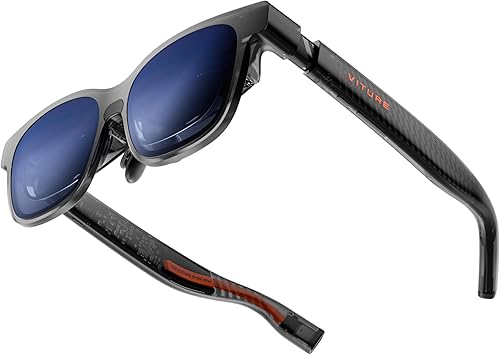
VITURE Luma, from its Amazon listing.
Credit: Amazon.com (Associates Program). Amazon listing
Product image from the Amazon listing.
In short
Get VITURE Luma for $399 if you want the lightest Luma, at 77 grams, or a myopia dial that reaches −6.0D, further than any other Luma. Its 1200p picture runs at up to 120 Hz and 1,000 nits on a 146-inch screen at a simulated 4 meters, with a 50° view and electrochromic dimming. Skip it for Luma Pro if you want a 152-inch screen, HARMAN audio or a Large frame, for $499.
Who it is for
- Nearsighted viewers who'd rather turn a dial than order lenses. Luma corrects myopia up to −6.0D on its own, with axis adjustment too.
- Anyone who wants into VITURE's Luma range for less: it's the lightest Luma and costs a hundred dollars less than Luma Pro.
- Handheld gamers. VITURE lists Steam Deck, ROG Ally and Legion Go, and the picture runs at up to 120 Hz.
Who should skip it
- Anyone who wants the bigger picture and HARMAN-tuned sound. Luma Pro has a 152-inch screen, a 52° field of view and HARMAN AudioEFX for $499.
- People whose IPD falls outside 56–72 mm. Luma comes in Regular only, while Luma Pro adds a Large size.
- Anyone who wants cameras or 6DoF tracking. That's VITURE Luma Ultra, with RGB and depth cameras.
- Buyers on a tighter budget. VITURE Pro 2 costs $299, weighs 63 grams and uses VITURE's UltraClarity 3.0.
What sets it apart
- Myopia adjustment up to −6.0D, the strongest in the Luma range, VITURE says.
- 77 grams, which VITURE says makes it the lightest Luma.
- Electrochromic film with a 0.5–40% range that switches in 0.1 seconds, with haze under 1%.
- A plain USB-C cable, 1.2 m long, where Luma Pro and Luma Ultra use a magnetic connector.
Caveats
- Audio is VITURE's AAC system; the HARMAN AudioEFX name belongs to Luma Pro, Luma Ultra and The Beast.
- Head tracking comes from software. VITURE's SpaceWalker app provides 3DoF, and 6DoF isn't supported.
- No battery. Luma runs on power from whatever it's plugged into.
Key specs
In the same order on every glasses page. Camera glasses, display glasses and screen glasses share one table, so a row that doesn't apply to these glasses says None.
| Spec | Value | Source and notes |
|---|---|---|
| Product family | Display glasses (personal monitor over USB-C) | VITURE Luma page |
| Frame styles | Regular only (IPD 56–72 mm), translucent frame; no Large size | VITURE Luma page |
| Frame material | Not named; VITURE describes a translucent redesign with flexible arms | VITURE Luma page |
| Weight | 77 g, the lightest Luma, VITURE says | VITURE Luma FAQ |
| Finishes | Translucent Luma frame | VITURE Luma page |
| Display type | Sony Micro-OLED | VITURE Luma page |
| Resolution | 1200p, which VITURE calls “4K-like”; 1200p at 60, 90 or 120 Hz in SpaceWalker desktop mode | VITURE Luma page |
| Field of view | 50° | VITURE Luma page |
| Peak brightness | Up to 1,000 nits | VITURE Luma page |
| Refresh rate | Up to 120 Hz | VITURE Luma page |
| Virtual screen size | 146″ at a simulated 4 m | VITURE Luma FAQ |
| Electrochromic dimming | Electrochromic film, 0.5–40%; haze under 1%; switches in 0.1 s; nearly 100% immersion, VITURE says | VITURE Luma specs |
| Camera | None; the developer module supports neither a camera nor 6DoF | VITURE Luma page |
| Video capture | None | VITURE Luma page |
| Recording indicator | None (no camera) | VITURE Luma page |
| Speakers | VITURE's AAC system with built-in spatial sound; 250 Hz ± 50; 9 volume levels; no earbuds needed | VITURE Luma specs and FAQ |
| Chip | None named; no 6DoF, and 3DoF comes from SpaceWalker | VITURE Luma page |
| Voice assistant | None; Immersive 3D is a SpaceWalker software feature | VITURE Luma FAQ |
| Battery, glasses | None; powered over USB-C | VITURE Luma specs and FAQ |
| Battery, case | None; a glasses case comes in the box | VITURE Luma box contents |
| Charging | Not needed; 1.2 m USB-C to USB-C cable in the box | VITURE Luma box contents |
| Power source | Direct USB-C from the connected device (no magnetic connector) | VITURE Luma specs |
| Prescription | Built-in myopia adjustment up to −6.0D, with axis adjustment; SGS A+ | VITURE Luma specs and FAQ |
| IPD and fit | Regular, 56–72 mm. Nose pads 1, 2 and 3; wear detection; suggested wearing time 3–4 hours | VITURE Luma page and specs |
| Controls | A single tap on the short right button toggles the electrochromic film; SpaceWalker handles multi-screen and 3DoF | VITURE lineup guide; Luma page |
| Connection | Direct USB-C. VITURE lists Windows and Mac, iPad, iPhone 15, 15 Pro and 16, Steam Deck, ROG Ally and Android phones with DisplayPort | VITURE Luma FAQ |
| Device compatibility | Handhelds including Steam Deck, ROG Ally and Legion Go. iOS spatial features need Adapter Ultra, Adapter Pro or Dock Mini | VITURE Luma page |
| Wi-Fi and Bluetooth | None; cable only | VITURE Luma FAQ |
| Sensors and tracking | Wear detection; 3DoF through SpaceWalker; no 6DoF | VITURE Luma page |
| App | SpaceWalker for Windows, macOS, iOS and Android. With a neckband: Pro up to 1200p at 90 Hz; One at 1080p and 60 Hz | VITURE Luma page |
| US price | $399 | viture.com, 19 September 2026 |
| Price band | Base Luma model | Based on the $399 price |
| Availability | On sale at viture.com for $399 on 19 September 2026, with free US shipping and 30-day returns | VITURE Luma page |
VITURE Luma extras
Specs only this model has.
| Spec | Value | Source and notes |
|---|---|---|
| Against Luma Pro | Luma: 146″, 50°, −6.0D, 77 g, direct USB-C, AAC audio, Regular only, $399. Luma Pro: 152″, 52°, −4.0D, HARMAN audio, magnetic connector, Regular and Large, $499 | VITURE Luma FAQ; Luma Pro page |
| In the box | Luma glasses, nose pads 1, 2 and 3, 1.2 m USB-C to USB-C cable, case, hair-friendly cover, cleaning cloth, quick start guide, safety guide | VITURE Luma box contents |
Luma or Luma Pro?
Luma Pro is the step up in VITURE’s Luma range. Here’s what the extra hundred dollars buys:
| Spec | Luma | Luma Pro |
|---|---|---|
| Virtual screen | 146″ at a simulated 4 m | 152″ |
| Field of view | 50° | 52° |
| Myopia adjustment | Up to −6.0D | Up to −4.0D |
| Audio | VITURE’s AAC system | HARMAN AudioEFX |
| Cable | Direct USB-C | Magnetic connector |
| Sizes | Regular (IPD 56–72 mm) | Regular and Large |
| Price | $399 | $499 |
The Pro gets you six more inches of virtual screen, two more degrees of view, HARMAN audio and a Large frame. Luma keeps the stronger myopia dial and the lighter frame, which makes it the better pick for nearsighted buyers past −4.0D. VITURE Luma vs Luma Pro compares them in full, and VITURE Luma Pro has its own guide.
Picture and dimming
Luma’s Sony Micro-OLED shows 1200p, which VITURE calls “4K-like”, at up to 1,000 nits and 120 Hz. In SpaceWalker’s desktop mode it runs 1200p at 60, 90 or 120 Hz. VITURE’s neckbands change that: the Pro neckband goes up to 1200p at 90 Hz, and the One neckband runs 1080p at 60 Hz.
A single tap on the short right button switches the electrochromic film, which VITURE says offers nearly 100% immersion.
Connecting it
Luma uses a plain USB-C cable rather than a magnetic one, with a 1.2 m USB-C to USB-C cable in the box, and it takes its power from the same port. VITURE lists Windows and Mac computers, iPad, iPhone 15, 15 Pro and 16, Android phones with DisplayPort output, and handhelds including Steam Deck, ROG Ally and Legion Go.
Fit
Luma comes in one size, Regular, for IPDs from 56 to 72 mm, with three nose pads to choose from. The translucent frame has flexible arms, and the box adds a case, a hair-friendly cover and a cleaning cloth.
Elsewhere in VITURE’s range
VITURE Luma Ultra is the Luma with RGB and depth cameras and 6DoF. Luma Cyber is a 10,000-unit Cyberpunk collectible edition. Outside the Luma line, VITURE Pro 2 is the $299 option; it handles dimming with a 5% film plus a shade rather than Luma’s electrochromic range.
Price
Luma was $399 at viture.com on 19 September 2026, with free US shipping and 30-day returns. Prices change, so check viture.com before you buy.
Sources
- Amazon product listing — accessed 2026-09-20
- VITURE — Luma product page and FAQ — accessed 2026-09-19
- VITURE — Luma series page — accessed 2026-09-19
- VITURE — Lineup guide: Pro 2, Luma series and The Beast — accessed 2026-09-19
Frequently asked questions
Can I use Luma without my glasses?
Yes, if you're nearsighted up to −6.0D. The built-in dial corrects for that, and VITURE adds axis adjustment.
Does Luma work with an iPhone?
Yes. VITURE lists iPhone 15, 15 Pro and 16, along with iPad. For iPhone spatial features you'll need an Adapter Ultra, an Adapter Pro or the Dock Mini.
Can I use it with a Mac or Windows PC?
Yes. VITURE lists both, and its SpaceWalker app runs on macOS and Windows to add multiple screens, 3DoF and Immersive 3D.
How long can I wear Luma at a time?
VITURE suggests 3–4 hours. The glasses also detect when you're wearing them.
Official product page: VITURE Luma. Specs: VITURE Luma specs.